
For several years, users have reported that they are unable to read PDF documents, such as order confirmations, invoices or purchase orders that are attached to emails. The text comes across as “garbled” or unreadable characters as shown below:
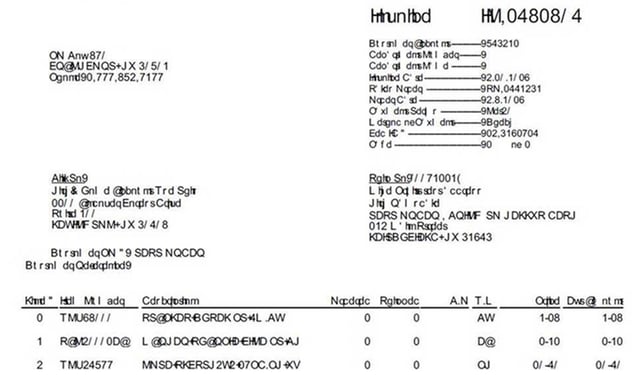
As most of us have experienced, this unreadable PDF version is not present to all users, and in some cases one person sees the unreadable text and another person sees it just fine…how can this be? This occurs because the PDF Viewer being used to view the PDF document does not recognize the font set in the document. Recently, we have seen an increase in the number of reported issues following Windows and Adobe security updates.
There can be several reasons why PDF documents are not rendering correctly, including: security changes made by software vendors, users operating system, web browsers do not have the proper plug-ins installed or the PDF reader software is not up to date or is improperly installed.
We found that users that have encountered this issue have been able to resolve the issue by 1) confirming the PDF reader software is up-to-date, or 2) opening the PDF in a different browser. In instances where these two options did not work, other options are available but require coding to change the font.
Below are some options to consider for resolving the unreadable PDF issue:
Embedded Fonts- Embedding fonts into documents can increase the size of the document by ~1MB for each attachment. This may not be an issue for single attachment but for multiple attachments, this can cause issues based on mailbox size limitations
- May require additional storage requirements and maintenance concerns as a result
- Some browsers may misinterpret embedded fonts: https://msdn.microsoft.com/en-us/library/ms533034(v=vs.85).aspx
- You have the option to save individual PDFs with embedded fonts. You can save the document to your local workstation, then forward the document to your customer
- If you have questions how to do this, please contact us
Substitute the Font
- You can select an alternative font to be displayed. We found that in most cases, setting the default font for the report to Helvetica works. Helvetica may not be the best option in all cases, so please review your options and test before deploying.

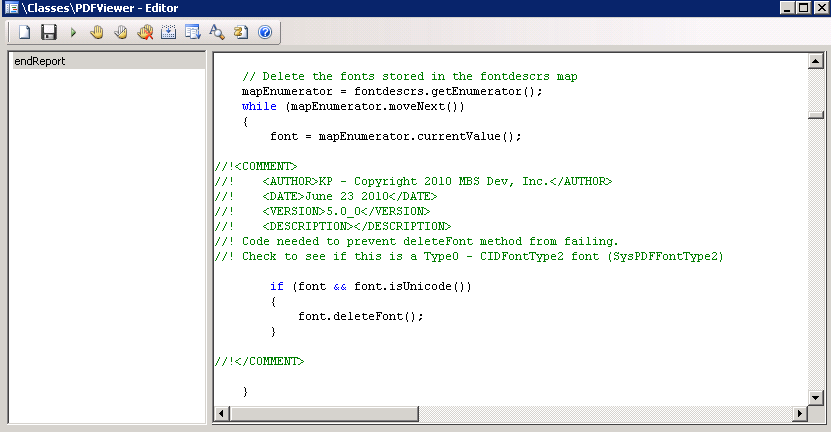
- In the PDFViewer class, it may be required to make a minor change. Without the fix, it always calls font.deleteFont() and this fails when using a predefined font such as Helvetica.
Meet the Authors
Scott Brubaker

A seasoned executive, Scott has held leadership positions with Dynegy, Sun Microsystems, HSBC
Greg Gustad
 Greg is a Senior AX Consultant at ENAVATE with three years of Microsoft Dynamics AX experience and over five years of writing and debugging various software systems. Greg has a Bachelor's Degree in Computer Science and a Microsoft Certification for AX2012 R3 Development.