
Utilizing Dynamics AX Consistency Check is a helpful, standard practice, but is no longer state-of-the art (best practice) for Dynamics AX systems.
Dynamics AX System Check-Up:
- Standard Practice: Proactively run Dynamics AX Consistency Check at least once per year.
- Emergency Practice: In-house red-alert; contract for additional POR services or specialist ($$).
- State-of-the Art (Best) Practice: For preventative maintenance, ENAVATE’s Health Check (AX app) is installed in your system and communicates critical system information to Power BI – 24/7 monitoring!
24/7 monitoring for your Dynamics AX system is ideal for daily self-checks and cleaning up data for upgrades and migrations to D365.
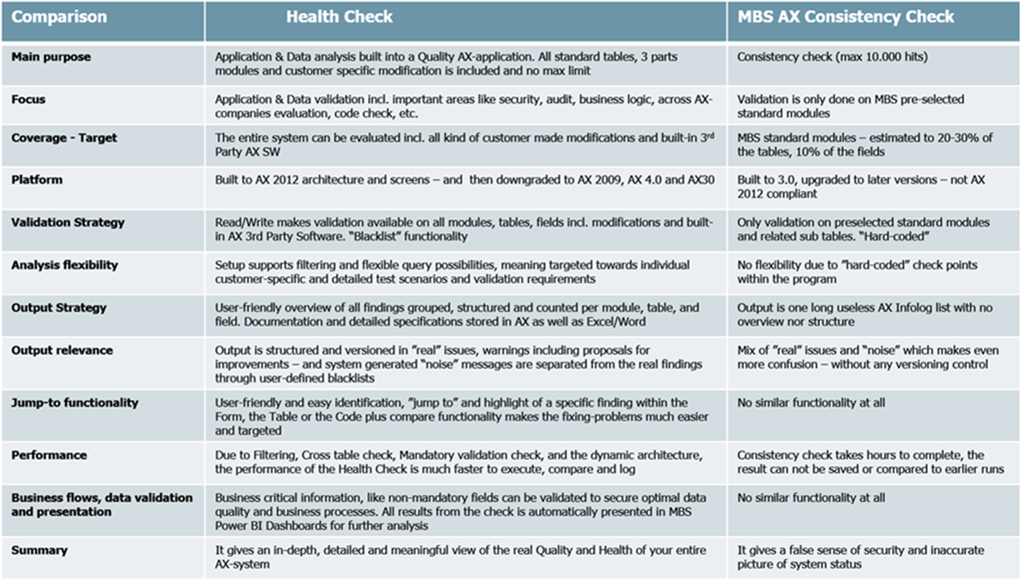
Consistency Check versus Health Check
- Dynamics AX Consistency Check uses the SysConsistencyCheck.kernalCheckRecord () method that iterates through all non-system record files and calls validateField () for making the AX kernel perform a check based on extended data types (EDT) and table relations (maximum 10,000 hits).
- ENAVATE’s Health Check reviews data integrity and application validation for all standard tables, 3 part modules and customer specific modifications with no maximum limit.
When compared to Consistency Check, Health Check provides a more accurate, in-depth, and comprehensive picture of the entire AX system. Click here to learn more about ENAVATE's Health Check solution.
About the Author - Kirk Dennis

Kirk is the Sales Lead for ENAVATE's ESOS solution. He has spent the last 41 years in IT Sales and Marketing. Kirk has a Bachelor’s Degree in Philosophy from Wittenberg University. He has studied Plato’s Universal Forms or Ideas since graduating from college; authored “The Precious Human Soul” (unpublished), and is the Creator of the Chalice Heart Teaching for spiritual education. Follow ENAVATE on Twitter (@ENAVATE) or LinkedIn.