
Post #4: Number sequencing functionality from Microsoft Dynamics AX to Microsoft Dynamics 365 for Operations
After finishing code migration to Microsoft Dynamics 365 for Operations, the customized Number Sequence class will be compiled successfully, but customized Number Sequence will not be available from user interface. You can perform the following steps to resolve the issues:
Step #1: Create a BuildModulesMapDelegate() delegate in the customized NumberSeqModule* class, which implements Number sequences of the customization:

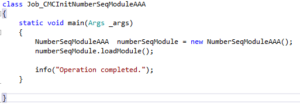
Step #2: Create and run a job to initialize the Number sequence in user interface:
About the Author - Paul Tseranidi, PMP

Paul is a Microsoft Certified Dynamics Professional with over 10 years of extensive Dynamics AX experience from v3.0 through AX 2012, and 365 including full cycle implementations of Dynamics AX in different regions of the world. Having more than 10 Microsoft Dynamics certificates, his primary focus is on the development of applications and software modules, and project management processes of AX Implementations.