
Vendor Consignment solution covers the process of managing the inventory which belongs to the vendor until it has been sold or consumed. Vendor Consignment business processes are used to minimize capital expenditure on the raw materials.
Consignment inventory is inventory that is owned by a vendor, but stored at your warehouse. When you are ready to consume or use the inventory, you take over the ownership of the inventory.
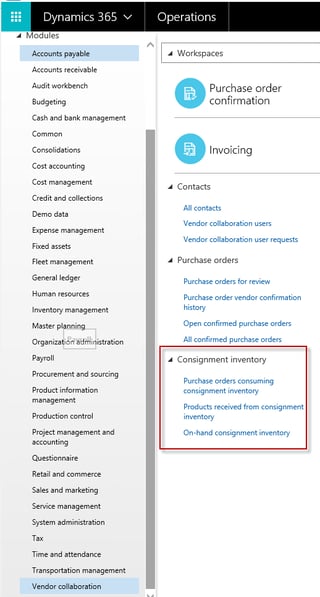
Products received from consignment inventory- Shows information about the items and quantities that have product receipts updated during the ownership change process.
Purchase orders consuming consignment inventory– Provides more detailed information related to purchase orders used for the ownership change from the consignment process.
Only Released products using Standard cost and Moving average costing methods are supported
You cannot use Master planning or any automated creation of journals regarding Vendor consignment
There is no possibility to move the inventory using Transfer order
You cannot perform the Quality associations with inventory that is owned by a vendor

Consignment inventory is inventory that is owned by a vendor, but stored at your warehouse. When you are ready to consume or use the inventory, you take over the ownership of the inventory.
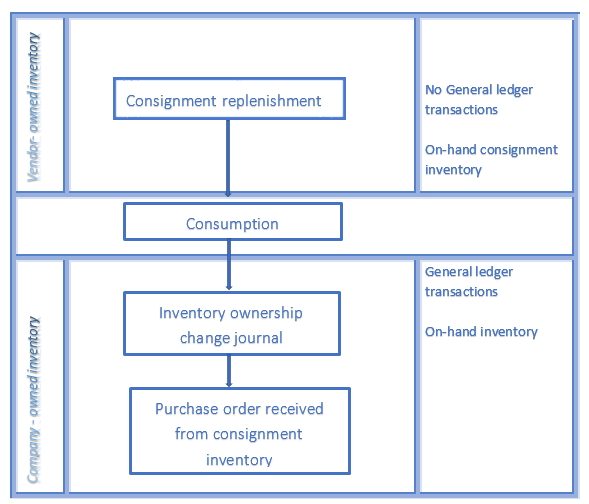
High Level Process Flow Diagram
This blog provides an overview of the Vendor consignment inventory capabilities in Microsoft Dynamics 365 for Operations (1611 release). By reading this blog, you can learn how to:
- Create the Released products with a new Owner tracking dimension which shows that those items can be used for the Vendor consignment
- Physically receive the vendor-owned On-hand inventory without General ledger transactions using the Consignment replenishment order functionality
- Consume the vendor-owned inventory by production order processes, such as the reservation and picking of the raw materials
- Change the ownership of the inventory from the Vendor to the current Legal entity using the Inventory ownership change journal
- Move the physical vendor-owned inventory between different warehouses using a Transfer journal
- Consumption reporting to vendor. Ability to monitor the vendor-owned inventory by Vendors using the Vendor collaboration functionality
Overview of the Vendor Consignment Settings
To record physical Vendor consignment, you need to define the following settings in the system:
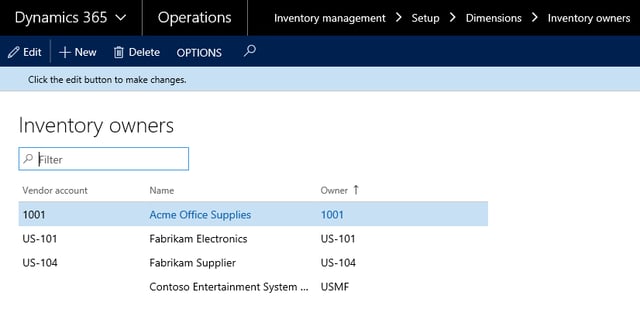
Inventory Owners
To track the vendor consignment inventory, the Inventory owner data should be defined. These Inventory owner records can be tied to the appropriate Vendor accounts. The current company (my example is USMF) has the separate Inventory owner record used for the transactions where the inventory is not consigned.
Tracking Dimension
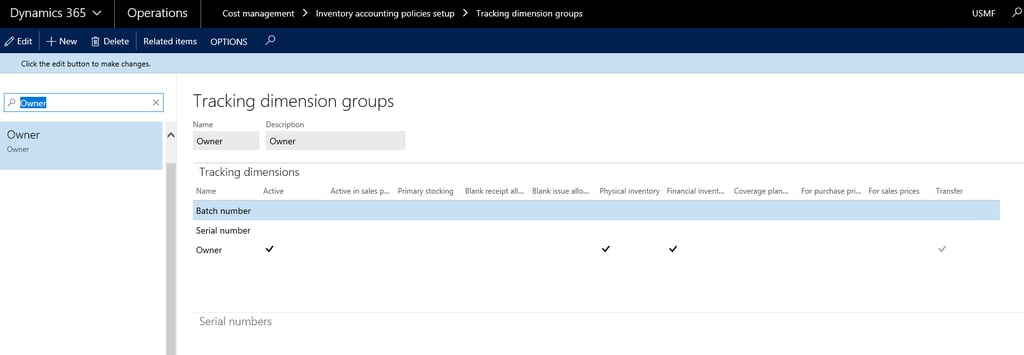
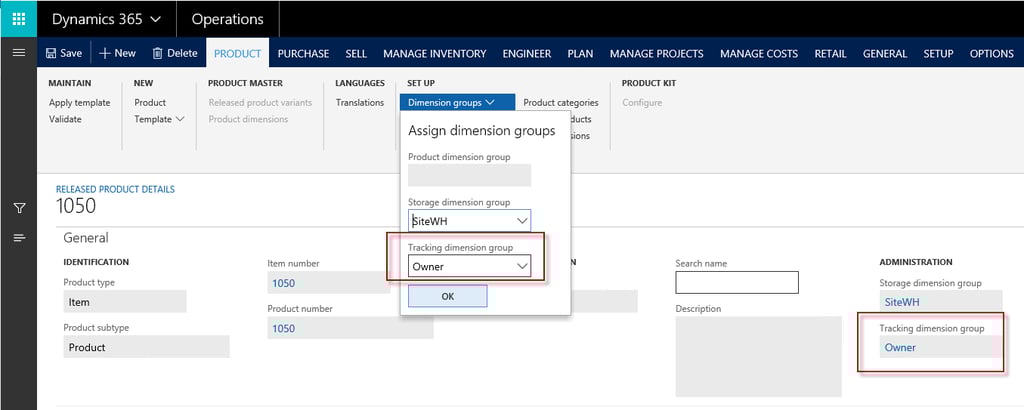
A new tracking dimension must be created with the Owner dimension activated. This tracking group should be assigned to the items which may go through the Vendor consignment.
The Owner dimension is used to separate information about which inventory is owned by the vendor and which is owned by the receiving legal entity.
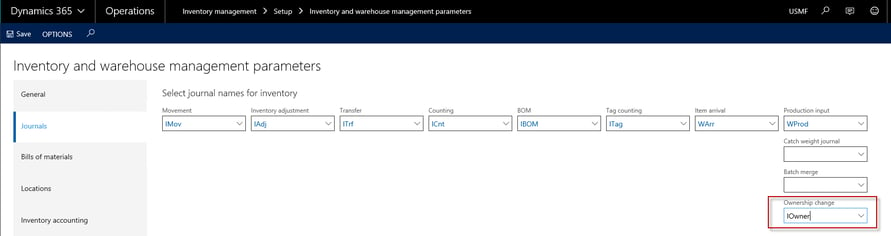
Default Journal for Ownership Change
In the Inventory and warehouse management parameters, the default journal for Ownership change journal must be specified.
Consignment Replenishment Orders
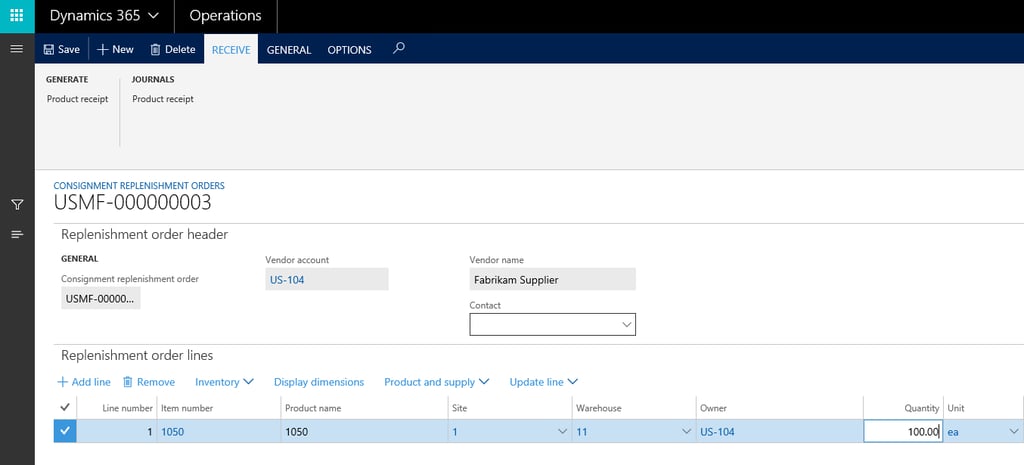
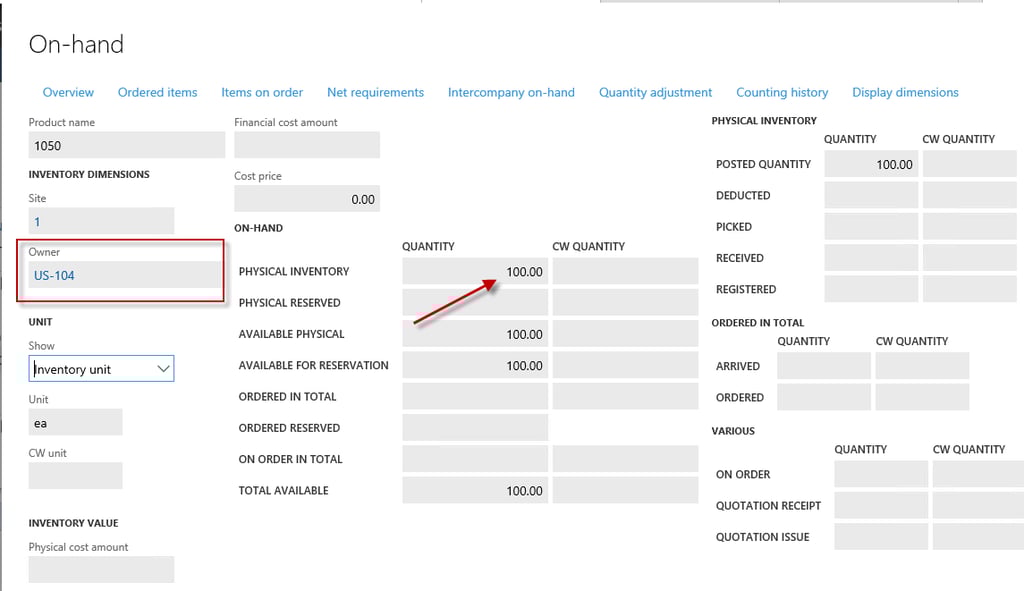
A consignment replenishment order is a document that is used to track the physical quantities of the vendor-owned inventory. Those orders are manually created based on the expected demand. When the inventory arrives at the company, the Product receipt is posted on the Consignment replenishment orders. As a result of the posting, we have physical vendor-owned On-hand inventory, but no general ledger transaction updates occur, no inventory value exists.
Consumption
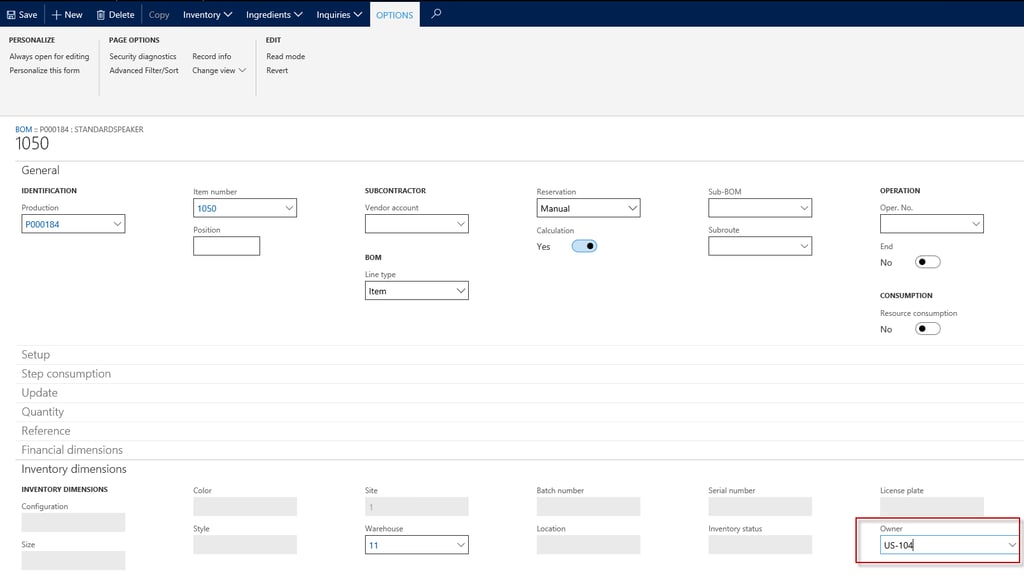
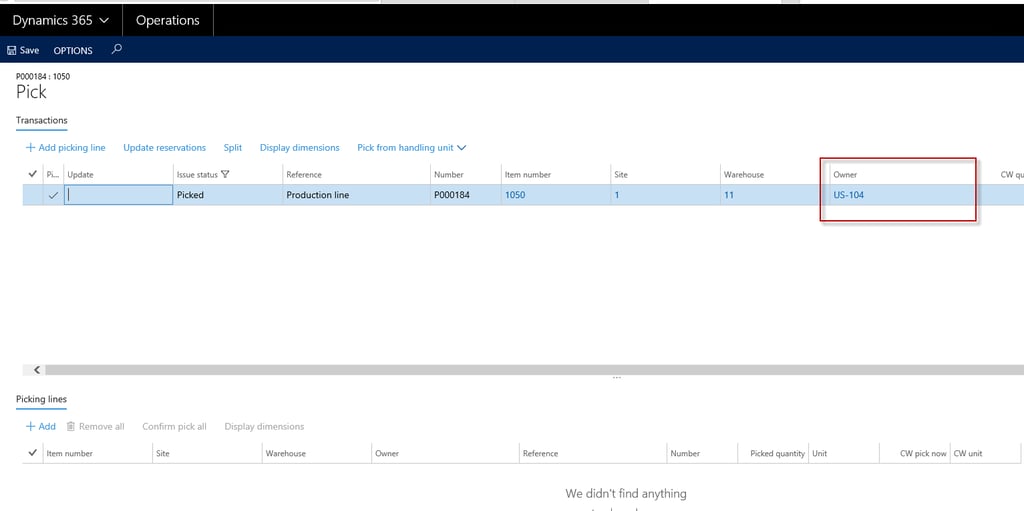
Production processes can reserve and pick the vendor-owned inventory. The production line inventory transactions can become Reserved or Picked with the Owner dimension linked to the appropriate Vendor accounts. When reserving, the on-hand inventory owned by the current legal entity will take precedence over the vendor-owned inventory.
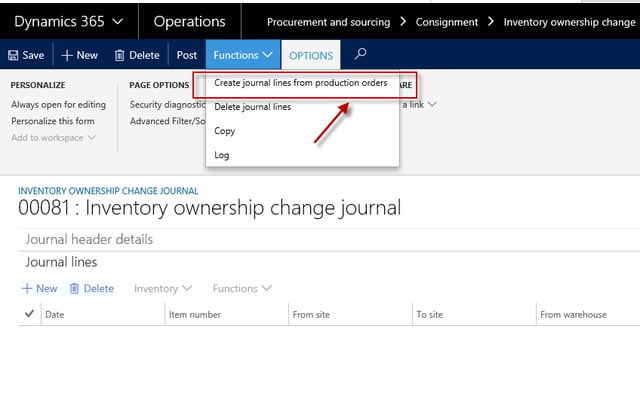
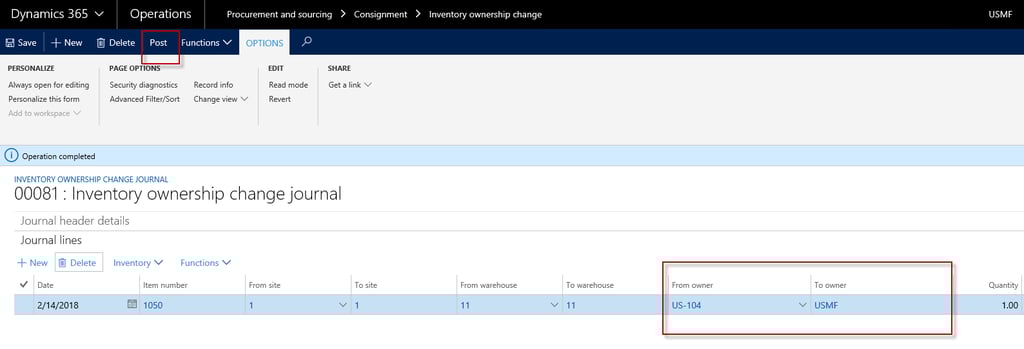
The Inventory ownership change journal is used to take the ownership. So, when the journal is posted, the Owner dimension is updated to Legal entity value automatically and On-hand inventory is received by the legal entity via a Purchase order process, so Inventory transactions will be posted to General ledger.
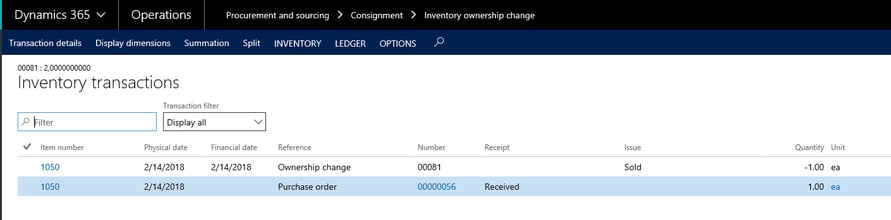
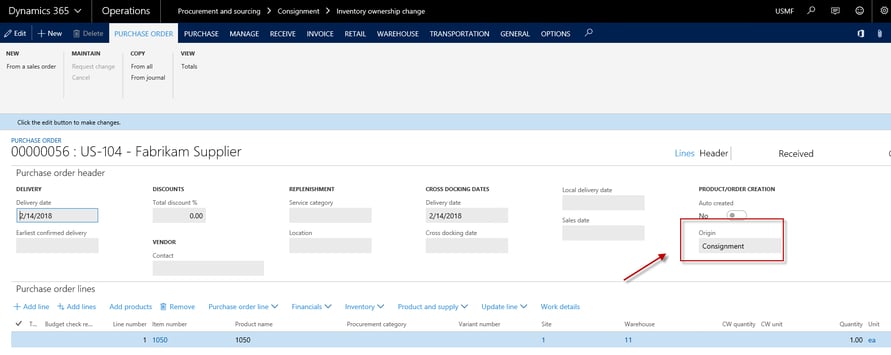
The received Purchase order is created based on the journal, which has the Origin field value is Consignment.
The external vendor can monitor and control the Consignment inventory ownership updates using the Vendor collaboration menu in 365:
On-hand consignment inventory– Provides the data about the consignment items that they are expected to deliverProducts received from consignment inventory- Shows information about the items and quantities that have product receipts updated during the ownership change process.
Purchase orders consuming consignment inventory– Provides more detailed information related to purchase orders used for the ownership change from the consignment process.
The physical inventory on-hand is updated using an Item counting journal. Counting can also be used by the vendor to update the on-hand inventory, if they have permission to do this.
The Design Limitations for the 1611 Release
Also, below is the list of current limitations of the Vendor consignment solution:
There is no ability to update the released products to a new tracking dimension groupOnly Released products using Standard cost and Moving average costing methods are supported
You cannot use Master planning or any automated creation of journals regarding Vendor consignment
There is no possibility to move the inventory using Transfer order
You cannot perform the Quality associations with inventory that is owned by a vendor
About the Author - Tetiana Kozhanova
Tetiana is a professional Dynamics 365 Consultant at ENAVATE, experienced in the system implementation, testing and functional design development. She has extensive project experience with numerous accomplished Dynamics AX ISVs and upgrade projects. Tetiana has deep knowledge of the Dynamics AX data model and areas, such as Trade and logistic, Finance and Production.