
We have had a lot of requests lately to resolve an error where a user cannot delete a sales order or a purchase order. The following is displayed when the user clicks the delete button:
“The [sales/purchase] order cannot be deleted because related not posted transactions exist.”
I am going to take you through an example for a sales order. However, the process for the purchase order is the same with the one exception being the menu locations as they are different.
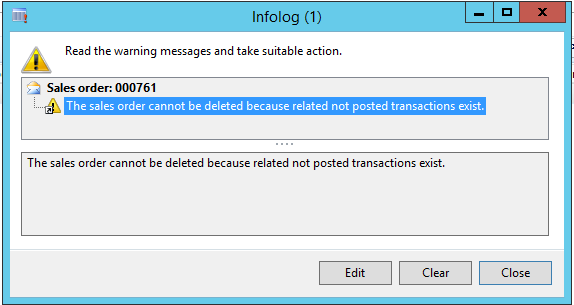
The error usually means that there is a document posting (confirmation, picking, packing, or invoice) that has been scheduled but has not completed yet or is stuck in a waiting status. Depending on the status of the sales order, you should be able to have an idea of what document is stuck. For my example, the status of the order is “Open Order” then the document causing the problem is likely the confirmation. You can view the list of confirmation jobs and their status by going to the “Sales and Marketing” module and selecting “Inquiries -> History -> Sales orders -> Confirmation.”
We can see that the sales order 000761 has a confirmation job in “Waiting” status:
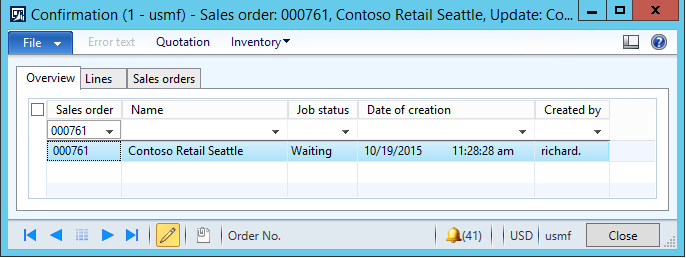
Any records in this form for this sales order in either “Waiting” or “Executing” status would prevent the sales order from being deleted. These records could be legitimately waiting to be executed by a batch job and execute without issue when that batch job runs/finishes, or these records could be stuck in this status and never process. In either case, from this form you can delete the line by going to File -> Delete record or by hitting Alt+F9. Once there are no more jobs in “Waiting” or “Executing” status for the sales order then the sale order can be deleted from the Sales Table form.
If there had been no record in the sales order confirmation history form or the sales order still cannot be deleted with the same error, then the search would continue through picking list, packing slip, and invoice histories until all records in “Waiting” or “Executing” statuses were removed.
The menu locations of these histories are in a couple places:
- Sales confirmation, picking list, and packing slip:
- Sales and Marketing -> Inquiries -> History -> Sales orders
- Sales invoices:
- Accounts Receivable -> Inquiries -> History
- Purchase order confirmation, receipts list, and product receipt:
- Procurement and Sourcing -> Inquiries -> Purchase orders -> History
- Purchase order invoice:
- Accounts Payable -> Inquiries -> History
About the Author - Greg Gustad
 Greg is a Senior AX Consultant at ENAVATE with three years of Microsoft Dynamics AX experience and over five years of writing and debugging various software systems. Greg has a Bachelor's Degree in Computer Science and a Microsoft Certification for AX2012 R3 Development.