Index Synchronization Issue Resolution
Post #2: Trailing is a guide on how to resolve a Microsoft Dynamics 365 for Operations index synchronization issue. The issue is that once a developer has modified any table indexes without changing any field, the modifications will not be synchronized to SQL server, while Visual Studio synchronization procedure will not throw any error.
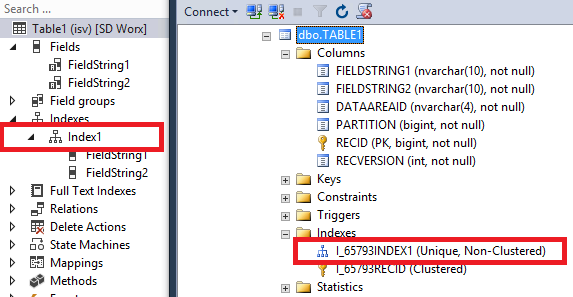
For example, a new Table1 table with FiledString1 and FiledString2 was created and synchronized to SQL:
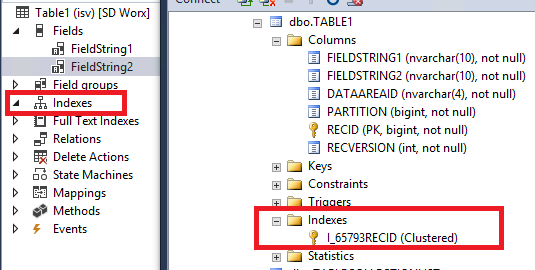
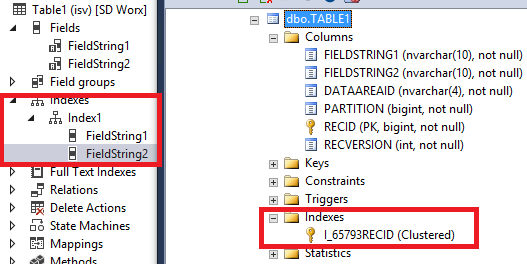
After creating an index to the table, it will not be synchronized by Visual Studio with default settings. The interesting thing is that Visual Studio throws no error, it just ignores index modifications during synchronization regardless of the way the synchronization process was executed – project, model or full synchronization:
Proper Way to Execute an Index Synchronization
Visual Studio should be opened with FallbackToNativeSync = true. To change the FallbackToNativeSync parameter, go to following folder/file:
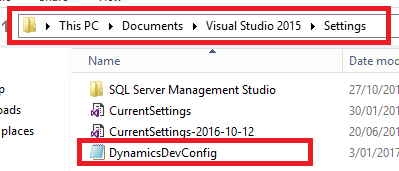
In this file, locate the FallbackToNativeSync parameter and change it to true:

After that, run Visual Studio once again and synchronize the table. Now the index should be synchronized properly: