
A practical look at what Business Central is. Explore why organizations are considering it, and when it makes sense to take the next step toward a connected, modern ERP system.
Key Takeaways
- Microsoft has shifted its investment away from Dynamics GP. New features, innovation, and long-term roadmap development are happening in Business Central, not GP.
- Business Central is not a replacement for GP's functionality. It covers the same financial foundations while adding cloud-native architecture, automated updates, and deeper integration with the Microsoft 365 ecosystem.
- The three capabilities BC delivers that GP cannot match today are continuous monthly updates with no downtime, connected reporting across finance, sales, and operations, and native automation for approvals, recurring journals, and integrations.
- A migration makes the most sense when an organization is approaching a hardware refresh, experiencing growth into new entities or markets, or spending significant staff time on manual processes that automation could handle.
- Organizations that have made the move to Business Central consistently report they wish they had done it sooner.
After 20 years of working with GP organizations, the question I hear most is: do we really need to move? My answer is always the same. If you are planning for the next five years, GP is not the answer. Not because it is broken, but because the innovation stopped. Every month your team spends on manual reconciliations, Excel exports, and VPN workarounds is a month of capacity you are leaving on the table. Business Central does not just replace what GP does. It changes what your team is able to do.
If you're still using Dynamics GP and hearing more about Microsoft Dynamics 365 Business Central, you're not alone. Many organizations are evaluating whether a Dynamics GP to Business Central migration makes sense, and when the right time to move might be. Let’s dig in.
Who This is For
Over the years, I’ve worked closely with Dynamics GP users and organizations navigating ERP migrations to Dynamics 365, and I’ve seen these challenges from many angles.
- Controllers quietly wrestling with inefficiencies and wondering if a change is worth the disruption.
- IT teams asked to evaluate new systems with little guidance.
- Executives who want to cut through the noise and understand what a move really entails.
This blog is for all of them.

Is Dynamics GP Still Supported?
Context on Where GP Stands Today
Dynamics GP has been around for a long time, and for good reason. It's a capable system that a lot of organizations have built their financial operations around. If you're on GP, you probably know it well, your team knows it well, and it mostly gets the job done.
But here's the reality: Microsoft has shifted its investment. GP is still supported, and it's not going away tomorrow, but the innovation is happening in Dynamics 365 Business Central. The roadmap for GP is pretty quiet these days. Updates are infrequent, new features are limited, and the underlying architecture wasn't designed for the cloud-first world we're living in now.
That doesn't mean you need to panic, but it does mean that if you're planning for the next five plus years, GP probably isn't the answer.
Why are Companies Moving from Dynamics GP to Business Central?
Here's something I say a lot: migrating to Dynamics 365 Business Central is a real opportunity to rethink how your team operates.
If any of these feel familiar, keep reading:
- Data Silos. Finance doesn't talk to sales. Inventory is somewhere else. Pulling a cross-functional report means touching three systems and hoping the numbers reconcile.
- Manual Processes. Month-end close involves a lot of manual reconciliations and Excel gymnastics. Your team is spending hours on work that should take minutes.
- GP feels dated (not broken, just stuck). You want to add an integration or automate a process, and the path to getting there is more complicated than it should be.
- Remote access is clunky (or nonexistent) Your team is tethered to the office or relying on VPN setups that are more duct tape than infrastructure.
None of that is a knock on Dynamics GP. It's been a solid product for decades. But the landscape has shifted, and Dynamics 365 Business Central was built for where things are heading, not where they were twenty years ago.
What is Microsoft Dynamics 365 Business Central, Actually?
Business Central is Microsoft's cloud-based ERP, and it sits squarely in the Microsoft 365 ecosystem. That means it's built to work alongside Teams, Outlook, Excel, and Power BI in a way that feels natural rather than forced. If your organization is already in the Microsoft stack, that's a meaningful advantage.
At its core, Business Central covers the same ground as GP: general ledger, accounts payable, accounts receivable, purchasing, inventory, and so on. The fundamentals are all there. But the way it handles those functions, and the way it connects them to the rest of your business, is where things get interesting.

3 Things Business Central Does Differently than Dynamics GP
1. Continuous updates, no downtime
Business Central updates monthly, automatically. No planning a maintenance window, no coordinating with IT to schedule an upgrade, no worrying about being two versions behind. You just always have the latest. Coming from Dynamics GP, where a version upgrade is a project in itself, this alone feels like a different world. Microsoft handles the infrastructure, the updates, and the security patches. Your team just shows up and works.
2. Reporting that doesn't fight you
Dynamics 365 Business Central pulls finance, sales, inventory, and operations into one connected data model. Power BI integration, Excel refreshes, dimensions, it's all built in. If you've ever spent an afternoon manually tying out a report in GP, or exporting data to Excel just to do basic analysis, you'll appreciate this immediately. Dimensions in Business Central are particularly powerful. They give you the ability to slice and analyze your data in ways that GP's chart of accounts structure makes difficult without a lot of workarounds. Think of it as getting the analytical flexibility of a more complex COA, without actually making your COA more complex.
3. Automation that's actually usable
D365 Business Central handles a lot of the stuff Dynamics GP users typically do by hand. The automation is native, not bolted on, which makes a real difference in how reliably it works.
-
Approval workflows can be set up without a developer
-
Recurring journals run themselves
-
Integrations with other systems are more straightforward, especially if you're already using other Microsoft tools or common third-party apps
Will BC Feel Totally Foreign to GP Users?
Honestly, less than you'd think. The core accounting concepts you know from GP are still there. Journals, posting, dimensions (similar to GP's segment-based reporting), vendor and customer management, the building blocks are familiar. The terminology shifts a little, but the logic underneath is the same.
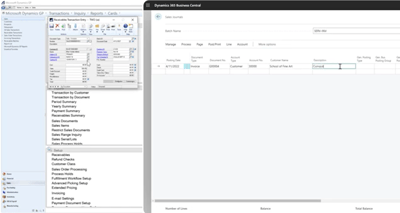
What takes a little adjustment is the interface and the workflow. BC is a browser-based application, which is a big shift if your team is used to the GP desktop client. Navigation works differently, and some processes that lived in one place in GP are organized differently in BC. That learning curve is real, and I don't want to minimize it.
Most teams get comfortable faster than they expect to after migrating to Dynamics 365 Business Central. The UI is clean and consistent, and because it's built on the same design patterns as the rest of Microsoft 365, it often feels somewhat familiar even on day one. Power users tend to find the keyboard shortcuts and personalization options pretty quickly, and that helps a lot.
See side-by-side comparisons of 12 functions in both GP and BC here.
When Should I Move from Dynamics GP to Business Central?
This is the question I probably get most often, and the honest answer is: it depends on where you are right now and where you're trying to go.
A GP to Dynamics 365 Business Central migration makes a lot of sense if:
- You're coming up on a hardware refresh or a Dynamics GP version upgrade, because that's a natural forcing function to evaluate your options.
- Your organization is growing, adding entities, or expanding into new markets, because BC handles multi-company and multi-currency scenarios well.
- Your team is spending significant time on manual processes that automation could handle.
It's probably not the right moment if you're in the middle of another major initiative, if your team is stretched thin, or if you're less than a year out from a big operational change. Migrations go better when the organization has bandwidth to do them right.
The good news is that Microsoft has invested heavily in migration tooling for Dynamics GP customers specifically. There are tools that help move your chart of accounts, your vendor and customer records, your open transactions, and your historical data. It's not a one-click process, but it's more structured than it used to be.
A Reality Check: It’s a Big Move, But Incremental Value Comes Early
Migrating from Dynamics GP to Dynamics 365 Business Central isn’t just replacing software, it’s reimagining how your organization runs. And that can be a bold step. But here’s the thing: the further you wait, the more you risk:
- Falling behind competitors adopting cloud‑native capabilities and modern analytics.
- Facing higher costs to maintain on‑premises infrastructure and third‑party add‑ons.
- Managing manual processes that constrain your team’s productivity.
A migration that’s planned and paced well doesn’t mean disruption, it means progress
Think of it like upgrading from a flip phone to a smartphone. The basics, making calls, sending messages, still work the same way. But the whole experience is different, and once you're used to it, going back feels unthinkable.
Most people who've made the move to Business Central say the same thing: they wish they'd done it sooner.
Start planning your GP to Dynamics 365 Business Central migration by going through our BC Readiness Checklist.
Frequently Asked Questions About Dynamics GP to Business Central
Is Dynamics GP going away?
Microsoft has confirmed ongoing support for Dynamics GP, but innovation and new feature development are focused on Business Central.
What is the difference between Dynamics GP and Business Central?
Business Central is a cloud-based ERP with built-in automation, integrations, and continuous updates, while Dynamics GP is an on-premises system with limited modernization.
How long does it take to migrate from Dynamics GP to Business Central?
Timelines vary, but most migrations take a few months depending on complexity, data, and customization requirements.
When should I move from Dynamics GP to Business Central?
The best time is during a major upgrade cycle, growth phase, or when manual processes and system limitations begin slowing your team down.
.png)